Event-Driven Architecture Explained with an Everyday Order
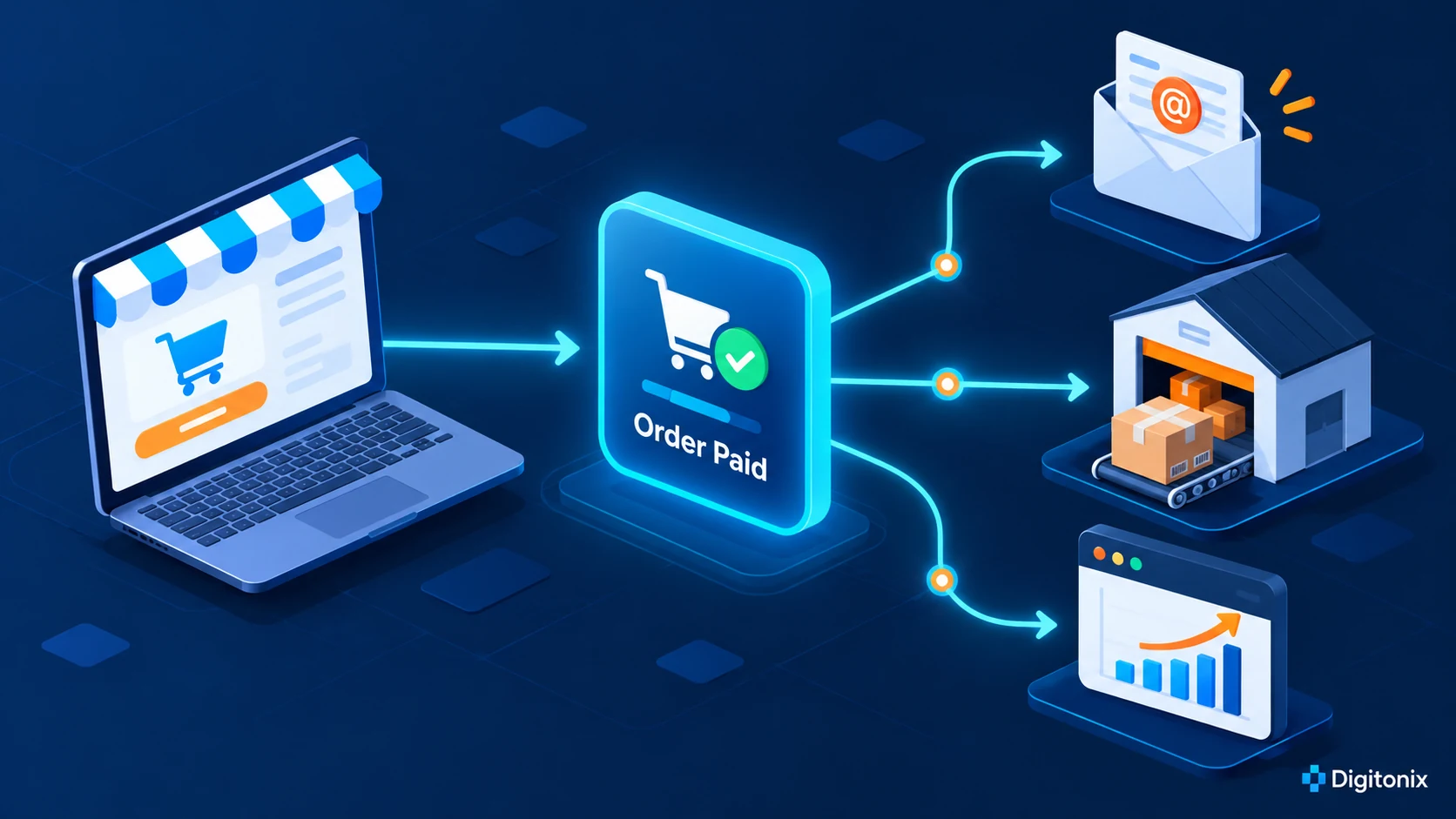
A customer has just paid for an order on your website. The payment has been successfully processed. There are a few things to do now: provide the customer with a receipt, notify the warehouse about the order, and update the sales report. These are the tasks that are connected but don't have to be done on the same screen or even within one second.
An event is a short message stating that something has happened. In our example, it will state "order paid." Other components of the application will be able to process this message and execute their actions. This approach to software development is called event-driven architecture.
As you can see, it may sound confusing but basically, it works like our everyday life. When an order comes into the restaurant, the kitchen starts cooking and the cashier starts handling the order. To put it simply, one order triggers two actions. Each team does its job without standing next to the customer at the counter.
What is an event in a business app?
An event records something that has already happened. A store might record OrderPaid. A clinic might record AppointmentBooked. An accounts team might record InvoiceApproved. Someone reading the name should understand the change without opening the code. It should not be a general direction like "process this" since the reaction differs from system to system.
An event includes an ID, time when it happened, and some facts that are necessary for the next system. For instance, an OrderPaid event may include the order ID and payment status. It doesn't need to have all information about the customer. Thus, it will make the message shorter and easier to secure.
Events do not suit every screen action. When a customer changes their password, they need an immediate result. They should not have to wait for an unknown background process. Events are effective when there is another task after a certain task or multiple systems use the same information.
A simple example: from payment to delivery
Imagine an online shop that uses a website, payment system, stock system, and email service. The customer pays for their order. The payment system notifies order system about successful payment. The order system saves the data and publishes an "OrderPaid" event.
In the warehouse, someone sees the paid order and puts the items aside. The email system sends the shopper a receipt. The sales dashboard updates a little later. The customer sees the confirmation while that reporting work continues.
This design helps when one part is slow. Suppose the email provider stops working for ten minutes. The paid order remains safely recorded. Once email works again, the team can retry the receipt. The retry needs clear rules and an owner. A broken email service should be visible to the team, while the stock and order systems continue their work.
Where might this approach help your business?
Start by finding a customer action that sets off several separate jobs. A new order may affect stock and email; a booking may affect a calendar and a reminder. This approach can help a team whose large app has become hard to change. For example, a notification service can handle messages without forcing every email change into the main app.
A new architecture needs a real reason. Start by drawing the current process. Ask staff where they copy details by hand. Watch where customers wait. Find the service that slows everything else down. If the current process works well, a direct connection may be the better choice.
Begin with one message and just one or two jobs that follow it. For a booking, try sending a confirmation and adding the appointment to a calendar. That small trial will reveal real problems before the team plans a much bigger system.
Name events so everyone understands them
Clear names help in communication between developers and business people about the workflow. “BookingConfirmed” is better than “bookingUpdate2”. Choose a name that describes an action already completed. Beside each name, record the exact moment when the app sends it.
It is also helpful to define what the event is not. "OrderPlaced" could mean the customer placed an order while "OrderPaid" would indicate that the payment has been made. They are different events. If the warehouse ships after "OrderPlaced," it may happen prior to receiving any payments. A short explanation can save you from an error that costs money.
Give an event a new version when its fields change. Each system must know whether it can read the message. Changing events must be handled the same way as changes to an API: there should be an owner, testing, and backward compatibility strategy.
Plan for repeat messages and late messages
In practical applications, an event can arrive twice. After completing some processing, a service could get disconnected, and thus, it will try again to deliver the message. When the email delivery service sends two receipts, it is inconvenient. When a payment processor charges a credit card twice, it is disastrous.
The receiving system should save the event ID and check if it has already done the job. This concept is called idempotency. It may sound sophisticated, but its essence is actually quite simple – doing the same job twice must give you the same results as doing it once, if possible.
Messages may arrive late or out of order. There might be cases when the cancellation comes before the booking update. Before acting, check the message against the latest booking or order record. A refund, stock change, or access change deserves another check. A person should review the most sensitive cases.
Protect the information inside an event
The event may pass through several systems. Each extra copy creates another place where private data may be exposed. Keep each message lean. The receipt service needs an order ID and a safe way to find the right email address. It has no reason to see card details.
Write down which systems are allowed to send or receive each message. Give them only the access they need. Keep private details out of error logs. Set a clear period for keeping old messages. When a customer requests a data change, your team should know every place that holds a copy.
Security implementation would be much easier if started at the very beginning. All that is needed is a simple diagram which shows the sender, the message flow, recipients, and components of the data.
How to tell whether it helped
The number of events is not a success measure. A lot of events can be generated while the clients will still be left waiting. Measure what counts – the period from the moment when money is received until confirmation, failed bookings, no stock and client calls because of their emails.
Measure the situation before you make any changes. If it takes fifteen minutes for the team to inform the warehouse about the placed order, write this down. Then compare this measurement with the measurement taken after the change of the workflow. Measure the number of failed attempts and retries. A faster system that loses orders is not an improvement.
Each reaction should have its owner. In case the event was published without the receipt, there should be somebody who knows which service needs to be investigated and how to retry. Ownership is as important as selecting the right technology.
How Digitonix can help
The Digitonix team will analyze your existing process flow and find the exact place where event-driven architecture can be used. They will design the application, build the connections, check retries and delays of messages, and set up monitoring properly. The first release of the system should have a specific measure of success and a safe fallback.
If your project involves a customer website, explore Digitonix’s web development service. For hosting and monitoring, see cloud and DevOps. For private data, include a cybersecurity review. Your workflow should guide the choice of tools. Digitonix works with Next.js, Python, and AWS where they fit.
Frequently asked questions
Does every business app need events?
No. A small application can take care of direct messaging between its parts. Events can help if one action will result in many actions, if some actions can be deferred, or if one slow service cannot keep other services waiting.
Are events the same as webhooks?
They are connected. A webhook is one of the most commonly used methods of sending messages to another system over the web. An event is a fact that should be reported. A business application may use webhooks for some events and message queues for others.
What if a message is lost?
The architecture will have to capture the event, deliver the message, retry in case of a failure, and alert a human in case the problem is not solved. A simple booking reminder needs a lighter design than a payment or refund process.
Can event-driven software make an app faster?
It can make the main action feel faster when later jobs move to the background. It does not make all systems faster automatically. A poor implementation may even cause delays, so it will need testing of the customer journey.
What is a good first event?
Select a clear business fact, for example "AppointmentBooked" that will trigger one or two actions of high value. Ensure that the existing process and its improvement are measurable.
Written by admin
Specializing in software-development, our experts bring years of industry experience to help you navigate complex digital challenges.
View all postsOn This Page

Ready to Build Something Great?
Partner with Digitonix, the leading IT company in Jaipur, for world-class web development, mobile apps, and digital marketing solutions. Join 500+ businesses achieving measurable growth.